AI Whiteboard Tutor vs AI Chatbot: STEM Learning Comparison
7 min read

Live AI whiteboard tutors outperform static text chatbots for complex STEM topics by providing real-time spatial context and interactive step-checking. When students tackle multi-step equations or architectural diagrams, text-based chatbots force visual and spatial concepts into linear text strings, creating cognitive friction during problem solving. This structural limitation fundamentally alters how information is processed by the working memory.
To quantify this advantage, a peer-reviewed randomized controlled trial found that students using an AI tutor achieved higher post-test scores than peers in traditional active learning environments, yielding an effect size of 0.73 to 1.3 standard deviations Engageli AI in Education Statistics. Furthermore, these students completed complex tasks significantly faster, dropping task completion time from 60 to 49 minutes Engageli AI in Education Statistics. Static text interfaces simply cannot achieve these efficiency gains because they lack a persistent workspace where errors can be spatially isolated and corrected on the fly.
Core Technical and Interface Differences
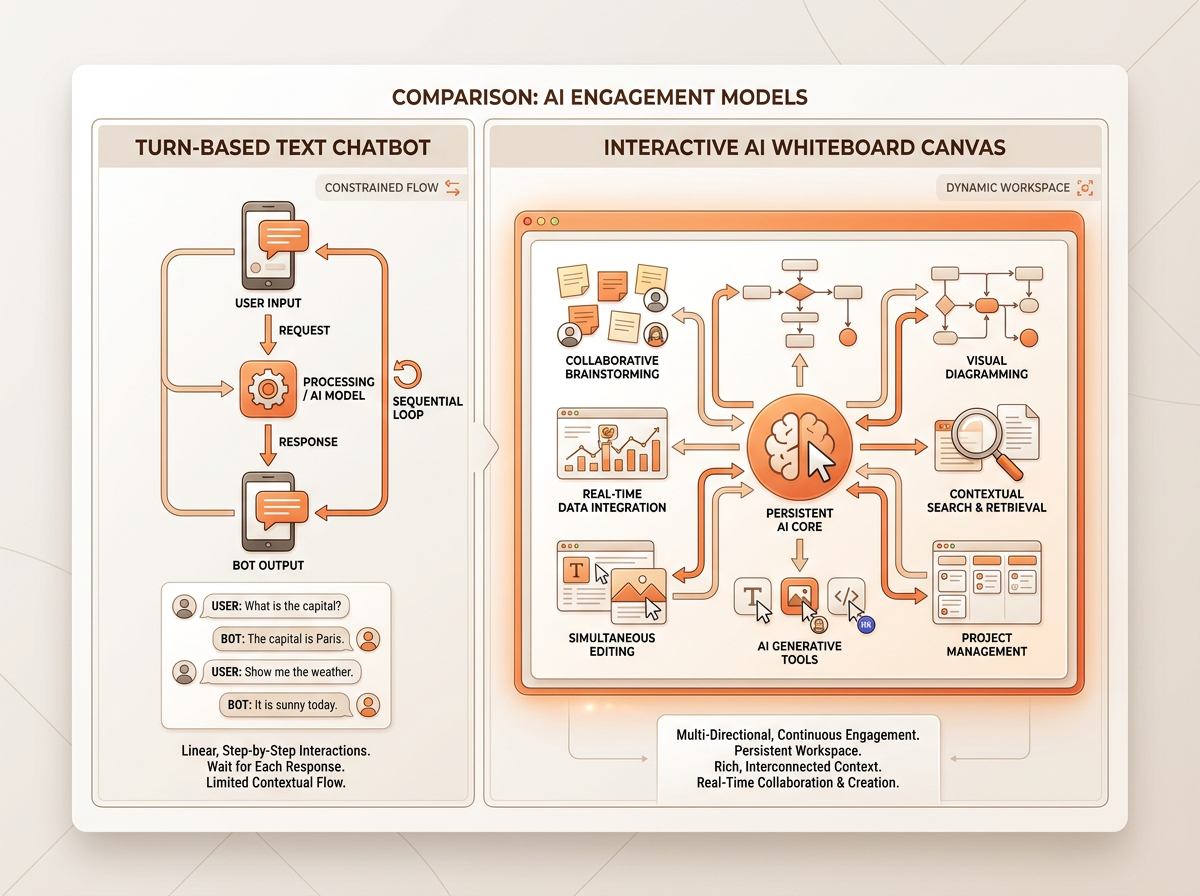
| Feature | Static Text Chatbot | Interactive AI Study Canvas |
|---|---|---|
| Workspace Architecture | Sequential, linear message history | Two-dimensional, infinite spatial plane |
| Input Modality | Text prompts and file uploads | Freehand drawing, typing, math blocks, and diagrams |
| Error Detection | Requires describing the mistake in words | Automated spatial step-checking and point-and-click highlighting |
| Feedback Loop | Asynchronous paragraph responses | Real-time visual annotations and dynamic interrupts |
Text chatbots operate on sequential text turns, requiring manual prompts for every iteration or clarification. When a student miscalculates a derivative, they must type out an explanation of their working instead of pointing directly to the faulty term. In contrast, interactive AI study canvases like iDroo AI Tutor, Flint K12, and Whiteboard AI provide a persistent two-dimensional workspace for diagrams, equations, and code tracing.
This persistent visual layout anchors the learning process. Advanced platforms like Professo enable dynamic interrupts, allowing real-time feedback while a student works through a visual canvas. Instead of waiting for a complete conversational response, the learner receives targeted insights directly on top of the equation or diagram they are currently constructing.
Usability Gap in Turn-Taking
Static chatbots create learning friction by requiring users to describe visual confusion in text rather than pointing at a specific step on a board. This conversational bottleneck forces learners to translate spatial intuition into verbal descriptions, consuming valuable cognitive bandwidth. If a student misplaces a negative sign in a complex physics vector calculation, explaining that location through sequential text prompts is tedious and error-prone.
Live AI whiteboards act as shared co-working spaces where spatial tracking detects exact points of student confusion in real time. The AI can monitor the workspace holistically, observing where strokes intersect or where a graph diverges from expected parameters. Eliminating textual re-prompting allows learners to focus cognitive energy on concept retention rather than interface management. The interaction mimics a human tutor sitting beside a paper notepad, observing the student's hand movements and intervening precisely when an error occurs.
Guided Coaching vs Direct Answers
Static chatbots frequently output complete solutions, encouraging passive consumption rather than active reflection. When a user pastes a programming bug or a calculus problem into a standard text box, the model often generates the final correct code block or answered equation immediately. This immediate gratification bypasses the struggle required to build long-term neural pathways.
Modern AI tutors leverage specialized coaching modes to deliver targeted hints, step-checking, and Socratic questioning based on platforms like Khanmigo and Duolingo Max. Instead of handing over the answer, these systems ask guiding questions that prompt the student to inspect their own work. Adaptive platforms like Professo prompt students to re-explain steps on the canvas to verify true conceptual mastery before advancing to the next phase of a multi-part problem.
Solving Multi-Step STEM Problems
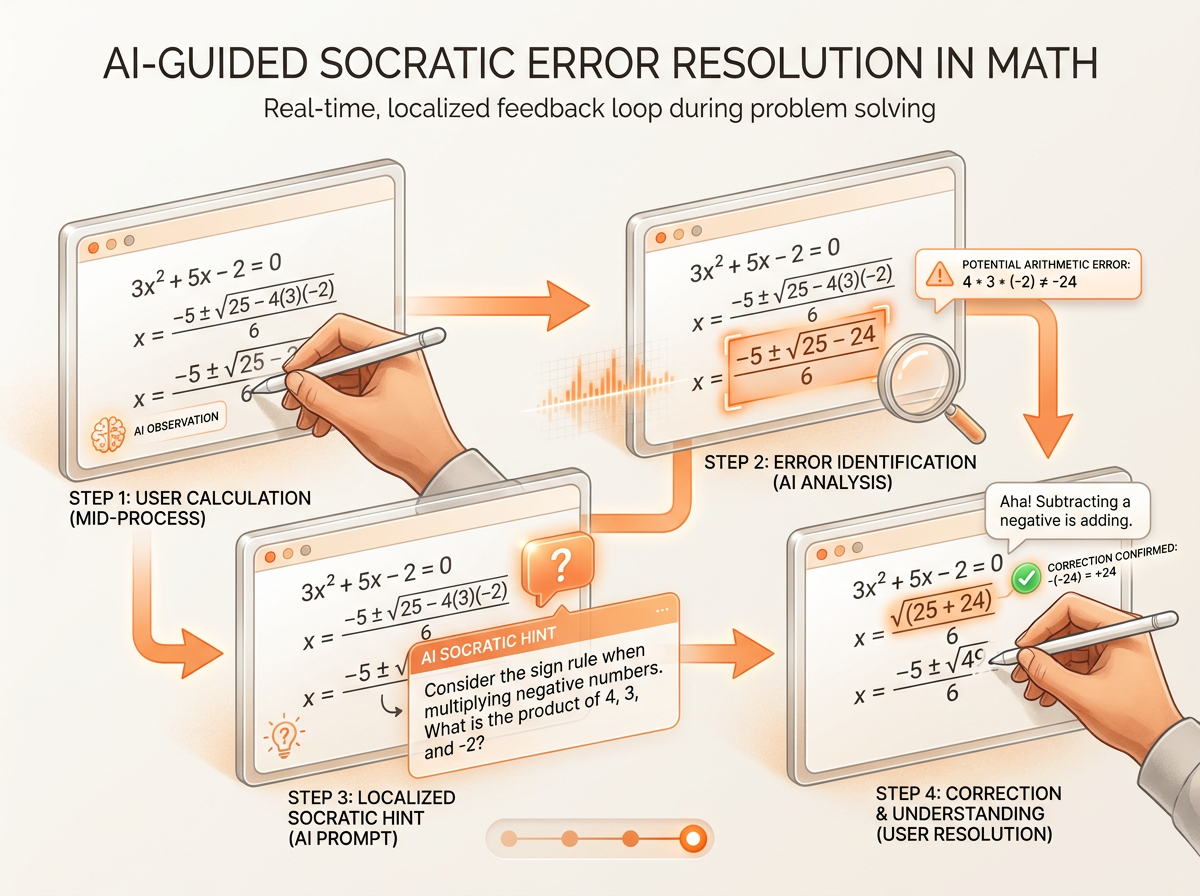
Complex STEM subjects like calculus, polar curves, and molecular structures require multi-dimensional visualization that linear text cannot represent effectively. Trying to understand the intersection of a three-dimensional surface through paragraph descriptions is nearly impossible for most learners. Interactive whiteboards allow real-time mathematical step-checking, flagging algebraic errors immediately on the canvas as the student writes out the formula.
Active visual problem-solving increases retention for university students, high schoolers, and working professionals upskilling in technical fields. When studying organic chemistry, a student needs to manipulate ring structures and electron push arrows visually. A live canvas enables the AI to evaluate these structural placements dynamically, ensuring the student grasps the underlying mechanical principles rather than merely memorizing text-based definitions.
EdTech Adoption and Market Trends
The global AI tutors market grew to $2.1 billion in 2025 and is projected to reach $2.7 billion by 2026 Grand View Research AI Tutors Market Report. This rapid expansion reflects a fundamental shift away from simple conversational tools toward structured, pedagogically sound learning environments. Educational institutions are aggressively moving past basic text models to adopt interactive solutions that support deep cognitive engagement.
Adoption is surging across K-12 and higher education, with 84% of high school students using generative AI and MagicSchool AI reaching over 6 million educators by late 2025 Tutorbase EdTech AI Statistics. Major platforms like Khanmigo scaled from 68,000 users in 2023–24 to over 1.4 million by mid-2025 as institutions demand interactive tutoring over passive chat Tutorbase EdTech AI Statistics. This data underscores an industry-wide recognition that learning tools must mirror the visual and iterative nature of human instruction.
Choosing the Right AI Modality
| Evaluation Criteria | Static Text Chatbot | Interactive AI Whiteboard Tutor |
|---|---|---|
| Best Suited For | Summarization, vocabulary, outlining, syntax checks | Calculus, physics derivations, geometry, code tracing |
| Cognitive Load | High verbal translation overhead | Low overhead; maintains direct spatial context |
| Feedback Mechanism | Linear text paragraphs | Spatial annotations, highlights, and Socratic prompts |
| Primary Limitation | Lacks spatial awareness and visual error-checking | Requires visual input interface (stylus or mouse) |
Static text chatbots excel at simple Q&A, textual summarization, vocabulary practice, and quick drafting tasks where spatial relationships do not matter. They are efficient for looking up definitions or generating outline structures for essays.
AI whiteboard tutors are superior for spatial reasoning, multi-step derivation, visual concepts, and interactive problem solving. Evaluating student needs based on topic complexity ensures optimal tool selection across self-directed, institutional, and corporate learning environments. Matching the interface to the cognitive demands of the subject matter prevents unnecessary learning friction.
Implementing Interactive Canvas Learning
Begin complex topics on an interactive canvas to establish spatial layouts, visual maps, and problem frameworks upfront. Before writing a single equation, sketch the known variables, boundary conditions, or structural diagrams to anchor your working memory.
- Leverage live interrupts: Use real-time interrupt capabilities to ask targeted questions the moment confusion arises during calculation or diagramming, rather than waiting until the end of a long problem.
- Practice active reflection: Summarize whiteboard diagrams verbally or visually to solidify long-term recall and verify that you understand the underlying concept rather than just following steps.
- Audit your workflow: Switch between text-based drafting and visual canvas mapping depending on whether you are organizing unstructured thoughts or solving rigorous mathematical derivations.
FAQ
Is an AI whiteboard tutor better than ChatGPT for math and science? Yes, an AI whiteboard tutor is significantly better for math and science because it accommodates spatial reasoning, equations, and diagrams that text-only models cannot properly parse. Instead of forcing you to describe a geometric proof or algebraic error in text, a whiteboard tutor sees your work directly on the canvas and flags errors precisely where they occur.
How does an AI whiteboard tutor help with complex step-by-step problems? An AI whiteboard tutor breaks down complex problems by monitoring your multi-step working in real time across a persistent visual workspace. It performs automated step-checking, ensuring you validate each algebraic transformation or chemical reaction before advancing to the next phase of the problem.
Why do static AI chatbots struggle to teach complex concepts? Static AI chatbots rely entirely on sequential text turns, which creates heavy learning friction when dealing with multi-dimensional topics. Users are forced to translate visual confusion and spatial layouts into verbal descriptions, robbing working memory of the capacity needed for deep comprehension.
Can AI tutors give hints instead of just giving the answer? Modern AI tutors utilize dedicated coaching modes designed to deliver targeted hints, step-checking, and Socratic questioning rather than handing over complete solutions. This approach encourages active student reflection and helps build genuine conceptual mastery instead of passive consumption.
What is the difference between an AI text chatbot and an interactive AI study canvas? An AI text chatbot operates through a linear text message history where users type prompts and receive paragraph outputs. An interactive AI study canvas provides a two-dimensional visual workspace supporting freehand drawing, math blocks, and diagrams with real-time spatial tracking and coaching.
Elevate your STEM mastery
Mastering advanced technical subjects requires tools that match the complexity of human spatial reasoning. By replacing rigid text boxes with an interactive visual canvas, you eliminate conversational friction and focus entirely on deep conceptual understanding.